Jump to content
View in the app

A better way to browse. Learn more.

124 Spider Club

A full-screen app on your home screen with push notifications, badges and more.

To install this app on iOS and iPadOS
  1. Tap the Share icon in Safari
  2. Scroll the menu and tap Add to Home Screen.
  3. Tap Add in the top-right corner.
To install this app on Android
  1. Tap the 3-dot menu (⋮) in the top-right corner of the browser.
  2. Tap Add to Home screen or Install app.
  3. Confirm by tapping Install.

Festival Italia

(0 reviews)

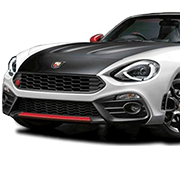
Festival Italia returns to Brands Hatch on Sunday 9th August 2026.

We've secured 20 spaces for cars (so far) - lets see if we can smash that number for the 3rd year in a row!

Our direct booking link is: https://displaymyvehicle.msv.com/calendar/brands-hatch/2026/august/festival-italia/apply?group=ffbbbbb6-e513-4044-953c-03664ce07e64


User Feedback

Join the conversation

You can post now and register later. If you have an account, sign in now to post with your account.

Guest
  • This will not be shown to other users.
  • Your Review Required
    Add a review...

Account

Navigation

Search

Configure browser push notifications

Chrome (Android)
  1. Tap the lock icon next to the address bar.
  2. Tap Permissions → Notifications.
  3. Adjust your preference.
Chrome (Desktop)
  1. Click the padlock icon in the address bar.
  2. Select Site settings.
  3. Find Notifications and adjust your preference.