
About the Venue
Brooklands is the world's first purpose-built motor racing circuit, built by local landowners Hugh and Ethel Locke King on 330 acres of farm and woodland on their estate at Weybridge in Surrey. Brooklands opened for racing in 1908.
Now an award-winning museum of international importance, Brooklands regularly hosts motoring events featuring classic as well as modern cars of all types.
Upcoming Events

One of the biggest events of the year at Brooklands, celebrating the UK’s obsession with all things Italian. Expect the site to be bursting with all makes of Italian cars and a few motorbikes.
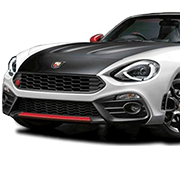
With a great selection of vehicles from Lamborghini, Maserati, Ferrari, Lancia, Alfa Romeo, Fiat and Abarth, there will be something for everyone to look at. Owners of Italian cars are welcome to bring it on the day, to join in with the fun.
The Mercedes-Benz World circuit will see a line-up of cars being demonstrated at lunchtime, while during the afternoon Test Hill will be running, pitting a line-up of cars against the challenge presented by this unique part of Brooklands. This year there will be just as much to see and do as before, including many trade and club stands, so come early, bring your camera and plan your whole day at Brooklands!
With a great selection of vehicles from Lamborghini, Maserati, Ferrari, Lancia, Alfa Romeo, Fiat and Abarth, there will be something for everyone to look at. Owners of Italian cars are welcome to bring it on the day, to join in with the fun.
The Mercedes-Benz World circuit will see a line-up of cars being demonstrated at lunchtime, while during the afternoon Test Hill will be running, pitting a line-up of cars against the challenge presented by this unique part of Brooklands. This year there will be just as much to see and do as before, including many trade and club stands, so come early, bring your camera and plan your whole day at Brooklands!
